

How Much RAM Do You Need in 2026? 8GB to 64GB Explained
How much RAM do you need in 2026? Our guide covers 8GB to 64GB by use case, DDR4 vs DDR5, speed and latency, dual-channel and why memory prices have soared.
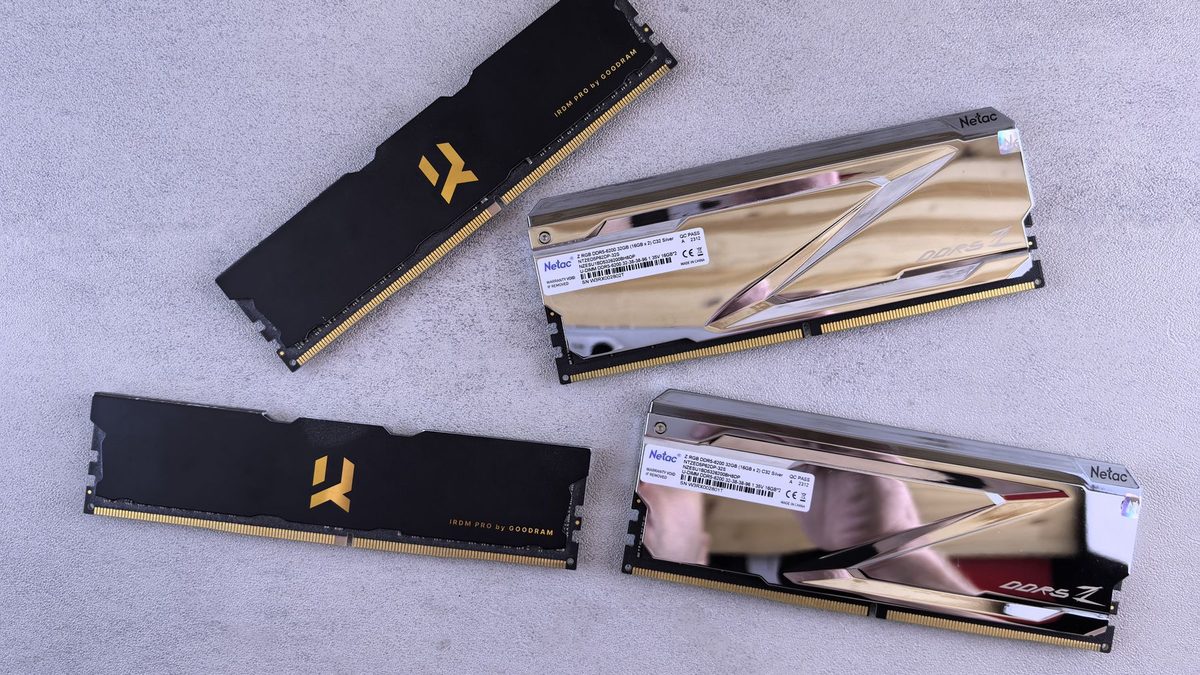
Memory is easy to get wrong. Buy too little and your system stutters the moment you open a game alongside a few browser tabs; buy too much and you have wasted money better spent on a faster graphics card. So how much RAM do you need in 2026?
The answer depends on what you do, but timing matters more than usual this year. Memory prices have surged as AI data centres soak up supply, so it pays to buy the right amount once rather than upgrading twice.
Key takeaways
- 16GB is the sensible minimum for a Windows 11 PC in 2026, and 32GB is the sweet spot for gaming and creative work.
- Two matched sticks running in dual-channel matter more than chasing the highest speed rating.
- DRAM contract prices roughly doubled in early 2026, so check whether a laptop's memory is soldered before you buy.
PC memory by the numbers
Valve's August 2026 Steam Hardware Survey shows that 16GB and 32GB together now account for nearly four in five gaming PCs, with 32GB steadily gaining ground.
How much RAM do you need for each use case?
If you keep PCs for many years, lean towards the higher figure.
| Use case | Minimum | Recommended | Why |
|---|---|---|---|
| Web, email and office work | 8GB | 16GB | Modern browsers use a lot of memory with many tabs open |
| Student and family laptops | 16GB | 16GB | Comfortable multitasking and room for AI features |
| Gaming at 1080p or 1440p | 16GB | 32GB | Games plus Discord, a browser and launchers add up fast |
| Gaming and streaming | 32GB | 32GB | Streaming software and chat run alongside the game |
| Photo and video editing | 32GB | 64GB | Large images, long timelines and preview caches |
| 3D work, virtual machines, local AI models | 64GB | 64GB or more | Each VM or model needs its own chunk of memory |
Microsoft's minimum for Windows 11 is just 4GB, but that is a floor, not a recommendation. Microsoft's own Copilot+ PC requirements call for 16GB of DDR5 or LPDDR5 memory, which tells you where the baseline for a new laptop now sits.
DDR4 vs DDR5: which should you buy?
In most cases your motherboard decides for you. The two types use differently keyed slots, so you cannot fit one in the other. AMD's AM5 platform and Intel's Core Ultra desktop chips are DDR5-only, while many Intel 12th to 14th Gen boards came in either a DDR4 or a DDR5 version.
DDR5 is the faster standard. JEDEC's original specification ran to 6400 MT/s, and an update in April 2024 extended it to 8800 MT/s, as AnandTech reported.
If you are upgrading an existing DDR4 system, stick with DDR4. With prices this high, adding to what you already own is often the best value.
Speed and latency: MT/s and CL explained
RAM speed is quoted in MT/s (megatransfers per second), although many shops still label it MHz. Latency is shown as CL (CAS latency), the number of clock cycles the memory takes to respond. Higher speed is better, lower CL is better, and the two trade off against each other.
To compare kits fairly, work out the real delay in nanoseconds: multiply CL by 2,000 and divide by the speed in MT/s.
- DDR4-3200 CL16: 16 x 2,000 / 3,200 = 10ns
- DDR5-6000 CL30: 30 x 2,000 / 6,000 = 10ns
- DDR5-6400 CL32: 32 x 2,000 / 6,400 = 10ns
The response time is similar, but DDR5 moves far more data per second. A DDR5-6000 kit at CL30 to CL36 is a popular, balanced choice; exotic speeds rarely justify the premium.
Turn on XMP or EXPO
New RAM runs at a conservative default speed until you enable its profile. Intel systems call this XMP; AMD's version is EXPO. AMD notes that running memory outside its published specifications counts as overclocking.
- Restart and enter the BIOS, usually by pressing Delete or F2.
- Find the memory profile setting, which may be called XMP, EXPO or something similar depending on your board.
- Select the profile, save and reboot. The first DDR5 boot can take a while as the system trains the memory.
- Open Task Manager, go to Performance, then Memory, and check the speed shown.
Why dual-channel matters
Two sticks beat one. Running in dual-channel doubles the paths between memory and processor, which helps games and especially integrated graphics. A 2 x 16GB kit will outperform a single 32GB stick.
Check your motherboard manual for which slots to use; on four-slot boards it is usually the second and fourth. Filling all four slots with DDR5 can force lower speeds, so two larger sticks are the better route to 64GB.
Buy your RAM as a matched kit of two. Mixing old and new sticks is the most common cause of memory instability.
Laptops: soldered memory vs SO-DIMM
Many thin laptops use soldered LPDDR5 or LPDDR5X memory. It is fast and efficient, but you can never upgrade it, so buy enough for the laptop's whole life. If you plan to keep it four years or more, consider 32GB.
Laptops with SO-DIMM slots let you add memory later. JEDEC also published the CAMM2 standard in December 2023, including an LPDDR5X version called LPCAMM2 that combines upgradeability with a slim design, as TechSpot reported. Few laptops use it so far, so check the spec sheet carefully.
Why RAM got so expensive in 2025-26
Memory makers have shifted production towards server memory and high-bandwidth chips for AI data centres, squeezing supply for PCs. TrendForce found that conventional DRAM contract prices rose by roughly 93-98% quarter on quarter in Q1 2026, and it forecast a further 58-63% rise for Q2.
The pace is slowing. In July, TrendForce forecast a 13-18% increase for Q3 2026, saying consumer customers have reached the limit of what they will pay. The retail market has also lost a familiar name: Micron announced in December 2025 that it would exit its Crucial consumer business, with shipments ending by February 2026.
So buy what you need, reuse existing memory where possible, and compare prices across retailers.
FAQ
Is 8GB of RAM enough in 2026?
For light browsing and documents it works, but Windows 11, a browser and a couple of apps fill it quickly. Choose 16GB for any new PC.
Can I mix different RAM sticks?
Often, but everything runs at the slowest stick's speed and stability is not guaranteed. A matched kit is safer.
Does faster RAM increase FPS?
It can help, especially with integrated graphics, but the gains are modest compared with having enough capacity in dual-channel.
Ready to upgrade? Browse more guides in our memory and RAM section, or see how it all fits together in our PC build guides.
Sources: PC Central (Steam Hardware Survey, August 2026), TrendForce 1Q26 DRAM revenue, TrendForce 2Q26 memory price forecast, TrendForce 3Q26 memory price forecast, Microsoft Windows 11 specifications, Microsoft Copilot+ PC requirements, AnandTech, AMD EXPO, TechSpot, StorageReview
 PC Build Guides
How to Build a Gaming PC in 2026: Parts, Prices and Steps
Learn how to build a gaming PC in 2026: three example builds with realistic UK prices amid soaring RAM costs, step-by-step assembl...
Read article
 Hardware Deals
Black Friday Hardware Deals 2026: How to Spot Genuine Bargains
Black Friday hardware deals land on 27 November 2026. Learn to spot fake "was" prices, use price trackers and know your UK return...
Read article
 CPU & GPU Rankings
CPU and GPU Rankings Explained: How to Read Tier Lists
CPU and GPU rankings explained: how gaming and productivity benchmarks build tier lists, why results change with resolution, and h...
Read article