

Storage: SSD, HDD & NAS Hardware
SSD vs HDD vs NAS in 2026: Which Storage Should You Buy?
SSD vs HDD vs NAS explained: NVMe Gen 3, 4 and 5 vs SATA, when hard drives still win on cost per TB, drive failure rates and how to back up properly.
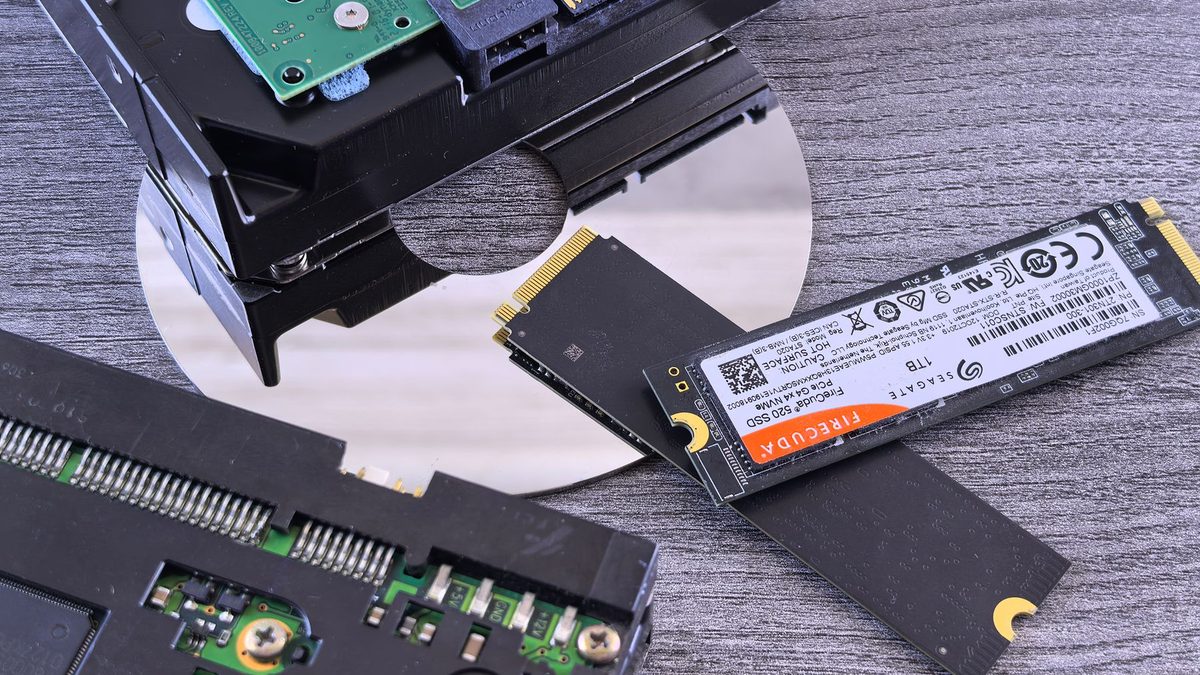
Storage used to be simple: one hard drive held everything. Today you can choose between blisteringly fast NVMe SSDs, roomy hard drives and network-attached storage boxes that back up the whole household. Picking the right mix of SSD vs HDD vs NAS saves money and, more importantly, protects your files.
This guide explains what each type does best, what the speed labels mean, and how to build a backup plan that survives a dead drive.
Key takeaways
- Put your operating system, apps and games on an NVMe SSD; PCIe Gen 4 is the sweet spot for most people.
- Hard drives remain far cheaper per terabyte, which makes them ideal for bulk storage and backups.
- RAID in a NAS protects against a failed drive, not against deletion, ransomware or fire, so follow the 3-2-1 rule.
Storage by the numbers
The cloud backup company Backblaze publishes failure data from its own data centres every quarter. Its Q1 2026 report shows hard drives remain dependable, while flash prices driven by AI demand have widened the cost gap between SSDs and hard drives.
SSD vs HDD vs NAS at a glance
The figures below are manufacturer ratings for representative drives, so treat them as best-case numbers.
| Type | Example drive | Rated read speed | Endurance rating | Best for |
|---|---|---|---|---|
| SATA SSD | Samsung 870 EVO 1TB | Up to 560 MB/s | 600 TBW | Reviving older PCs and laptops |
| NVMe PCIe Gen 3 | Samsung 970 EVO Plus 1TB | Up to 3,500 MB/s | 600 TBW | Budget builds and older boards |
| NVMe PCIe Gen 4 | Samsung 990 PRO 2TB | Up to 7,450 MB/s | 1,200 TBW | Gaming and everyday PCs |
| NVMe PCIe Gen 5 | Samsung 9100 PRO 2TB | Up to 14,800 MB/s | 1,200 TBW | Huge file transfers and workstations |
| NAS hard drive | Seagate IronWolf Pro 24TB | Up to 285 MB/s | 550TB a year workload | Bulk storage, media and backups |
| NAS box | Two or more drives on your network | Limited by network speed | Depends on drives | Shared files and household backups |
NVMe Gen 3, Gen 4 and Gen 5 vs SATA
SATA SSDs use the same connection as hard drives and top out around 560 MB/s, according to Samsung's 870 EVO specifications. That still feels transformative in an old laptop that has a spinning disk.
NVMe SSDs plug into an M.2 slot and talk directly to the processor over PCIe lanes. Each generation roughly doubles the ceiling: Samsung rates its Gen 3 970 EVO Plus at up to 3,500 MB/s, the Gen 4 990 PRO at up to 7,450 MB/s and the Gen 5 9100 PRO at up to 14,800 MB/s.
For booting, browsing and loading games, most people will struggle to feel the difference between Gen 4 and Gen 5. The extra bandwidth matters most when you copy very large files. Before buying, check:
- Your M.2 slot: a Gen 5 drive works in a Gen 4 slot, but only at Gen 4 speeds.
- Cooling: Gen 5 drives run hot and usually need a heatsink.
- Flash type: TLC drives generally sustain speed and endurance better than cheaper QLC models.
When hard drives still make sense
Hard drives win on cost per terabyte, and the gap has widened. Vdura's index, reported by Notebookcheck in August 2026, put a 30TB enterprise SSD at about US$22,600 against around US$1,216 for an equivalent hard drive. Consumer prices differ, but flash is under pressure too: TrendForce forecast NAND contract prices would rise 70-75% in Q2 2026 and a further 10-15% in Q3.
That makes hard drives the sensible choice for photo archives, film libraries, backup targets and NAS boxes. For NAS use, choose drives built for it and check they use CMR rather than SMR recording, which can struggle during RAID rebuilds. Just do not use one as your boot drive; next to an SSD, a hard drive is slow and more fragile.
Drive failure rates: what Backblaze's data shows
In its Q1 2026 Drive Stats, Backblaze recorded a quarterly annualised failure rate of 1.24% and a lifetime rate of 1.39%. Its announcement noted that 92% of newly deployed drives exceed 20TB.
Results vary widely by model. The 14TB Seagate ST14000NM0138 posted a 4.9% quarterly rate, while Toshiba's 24TB MG11ACA24TE managed 0.22%. These are data-centre drives under constant load, so treat the figures as a guide to reliability trends rather than a promise for your own disk. Every drive fails eventually.
SSD endurance: what TBW really means
TBW (terabytes written) is the amount of data a manufacturer warrants you can write before the drive may wear out. Samsung's 870 EVO 1TB carries a five-year warranty or 600 TBW, whichever comes first. Spread over five years, that is about 329GB written every day, far more than a typical home user manages. Endurance rarely limits a modern SSD; accidental deletion and sudden failure are bigger risks.
NAS for home backups: RAID is not backup
A NAS is a small, always-on computer full of drives that every device in your home can reach. Most two-bay models use RAID 1, mirroring one drive onto the other so a single failure loses nothing.
But RAID copies mistakes instantly. Delete a folder, or let ransomware encrypt it, and both drives change together. That is why you also need the 3-2-1 backup rule: three copies of your data, on two types of storage, with one copy offsite.
- Fit a two-bay NAS with matching NAS-rated CMR drives and set up RAID 1.
- Schedule automatic backups from every PC and laptop to the NAS.
- Turn on snapshots or file versioning so you can roll back deletions.
- Add an offsite copy using a cloud backup service or a drive kept elsewhere.
- Test a restore every few months.
Remember your network sets the pace: gigabit Ethernet tops out at about 125 MB/s in theory, so a 2.5GbE connection is worth it for big transfers.
If every copy of your files lives in one box, you have one backup, however many drives are inside it.
FAQ
Should I buy a Gen 5 SSD for gaming?
Only if the price gap is small. A good Gen 4 drive loads games quickly and runs cooler, and the money saved is better spent on a faster graphics card.
How long do hard drives last?
Many last for years, but failure rates vary by model and age. Backblaze's data shows most drives perform well, which is exactly why a backup matters for the ones that do not.
Is an external USB drive enough for backups?
It is a good start and counts as one copy. Add an offsite or cloud copy to complete the 3-2-1 rule.
Explore more drive advice in our storage guides, or speed up your home network for NAS transfers with our networking section.
Sources: Backblaze Drive Stats Q1 2026, Backblaze press release, Notebookcheck, TrendForce 2Q26 forecast, TrendForce 3Q26 forecast, Samsung 9100 PRO, Samsung 990 PRO, Samsung 970 EVO Plus, Samsung 870 EVO, Seagate IronWolf Pro 24TB, Backblaze 3-2-1 backup strategy
 PC Build Guides
How to Build a Gaming PC in 2026: Parts, Prices and Steps
Learn how to build a gaming PC in 2026: three example builds with realistic UK prices amid soaring RAM costs, step-by-step assembl...
Read article
 Hardware Deals
Black Friday Hardware Deals 2026: How to Spot Genuine Bargains
Black Friday hardware deals land on 27 November 2026. Learn to spot fake "was" prices, use price trackers and know your UK return...
Read article
 CPU & GPU Rankings
CPU and GPU Rankings Explained: How to Read Tier Lists
CPU and GPU rankings explained: how gaming and productivity benchmarks build tier lists, why results change with resolution, and h...
Read article